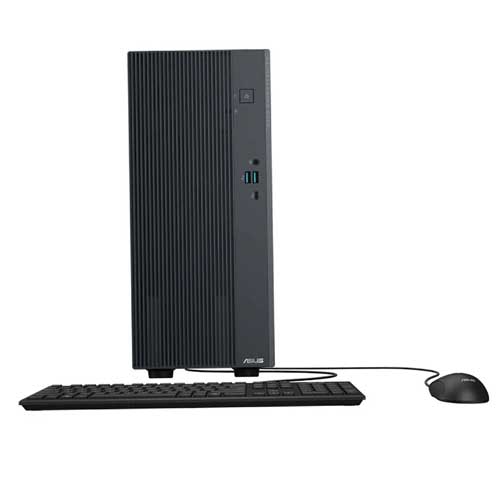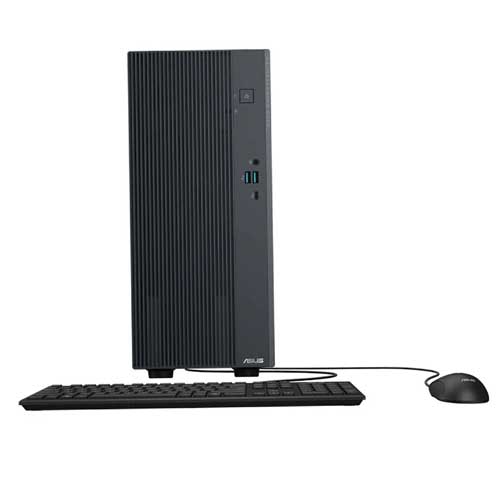
Asus ExpertCenter P500 Mini Tower P500MV Intel Core 7 240H 32GB RAM 512GB SSD Brand PC
Regular Price:৳0.00Availability: SKU: 2.18.296.8877
Quick Overview
-
Support
Saturday – Thursday: 09 AM - 06 PM. -
Payment
Cash on Delivery | Card | Online Payment -
Shipping Cost
Inside Dhaka 200tk | Outside Dhaka 350tk -
Warranty Policy
Read More
Description
Asus ExpertCenter P500 Mini Tower P500MV Intel Core 7 240H 32GB RAM 512GB SSD Brand PC in Bangladesh
A desktop PC should not force you to choose between speed, practicality, and long-term usability. That is exactly where the ASUS ExpertCenter P500MV makes a compelling case. Designed for demanding everyday work inside a compact mini-tower chassis, this business-oriented desktop brings together Intel processing power, fast DDR5 memory, PCIe 4.0 NVMe storage, modern connectivity, and an upgrade-friendly internal design.
The configuration featured here pairs the Intel Core 7 Processor 240H with 32GB RAM and a 512GB SSD, creating a balanced platform for professionals, offices, students, entrepreneurs, and advanced home users who want a dependable desktop rather than a disposable entry-level machine. ASUS officially lists the Core 7 240H as a P500MV processor option, with 10 cores, 16 threads, a 2.5 GHz base frequency, up to 5.2 GHz maximum turbo frequency, and 24MB cache. ASUS also lists 32GB DDR5 SO-DIMM configurations and a 512GB M.2 2280 PCIe 4.0 NVMe SSD option for this platform.
What makes the ASUS ExpertCenter P500MV interesting is not simply the specification sheet. It is how those specifications come together in daily use. Opening a large spreadsheet, switching between browser tabs, preparing a presentation, working on documents, attending online meetings, managing accounting software, handling business applications, or moving large files should feel like part of a continuous workflow instead of a series of interruptions.
The experience starts with the processor.
Processing Power That Works With You
The Intel Core 7 Processor 240H sits at the heart of this configuration. ASUS specifies this processor for the P500MV with 10 cores and 16 threads, a 2.5 GHz base clock, up to 5.2 GHz turbo frequency, and 24MB cache.
Those numbers matter because modern computing is rarely about running a single program in isolation. A typical workday may involve a browser with numerous tabs, an office application, cloud services, messaging software, PDF documents, music, and a video conference all running within the same session.
A processor with substantial multi-core capability gives the system more room to manage those simultaneous workloads. Instead of thinking only in terms of raw clock speed, it is more useful to think about what happens when your workload becomes complicated.
For example, imagine preparing a monthly business report. You may have Excel open with multiple worksheets, Chrome running several research tabs, a PDF reference document on another monitor, and a video call taking place in the background. The ASUS ExpertCenter P500MV is built around a processor platform intended to handle this kind of multitasking environment.
The Core 7 240H can also reach up to 5.2 GHz, according to ASUS. That high turbo ceiling is relevant when applications need bursts of processing power. In real-world use, this can contribute to responsive application launches, quicker completion of demanding CPU-based tasks, and smoother interaction with software that benefits from faster single-thread or lightly threaded performance.
It is important, however, not to confuse processor capability with a guarantee of identical performance across every application. Software is designed differently, and real-world speed depends on the program, workload, thermal conditions, operating system, drivers, and other hardware. The strength of this configuration is that it provides a powerful foundation for a broad range of professional and personal workloads.
32GB DDR5 Memory for Serious Multitasking
One of the most useful aspects of this particular configuration is the 32GB DDR5 RAM.
Memory capacity becomes increasingly important as applications become heavier and users expect to keep more programs open simultaneously. With 32GB available, the system has considerably more headroom than a basic desktop configured with a smaller memory capacity.
The P500MV uses DDR5 SO-DIMM memory and has two memory slots, with ASUS listing support for up to 64GB total memory depending on configuration.
That gives this desktop a practical path for future expansion.
For a professional user, the benefit of 32GB is easy to appreciate. Large Excel workbooks, business software, browser sessions, design tools, communication platforms, and background utilities can coexist more comfortably.
For a student, it means there is enough memory for research-heavy study sessions without building the entire workflow around constantly closing applications.
For an office, it provides additional breathing room as software requirements grow.
For a home user, it means the desktop can comfortably become the central machine for browsing, productivity, entertainment, file management, and everyday computing.
The important point is not simply that the computer has 32GB. It is that 32GB DDR5 gives the system a modern memory platform designed for multitasking and future software demands.
Fast 512GB PCIe 4.0 NVMe SSD
Storage is another area where this configuration feels noticeably more modern than traditional hard-drive-based office PCs.
The ASUS ExpertCenter P500MV supports a 512GB M.2 2280 NVMe PCIe 4.0 SSD configuration. ASUS also confirms two M.2 2280 storage connectors and two SATA 6.0Gb/s ports on the platform.
The 512GB SSD gives you a practical combination of speed and usable capacity. Because it is an NVMe SSD using PCIe 4.0 connectivity, everyday operations can feel considerably more responsive than older storage architectures.
This matters when starting the computer, launching software, opening large documents, loading project folders, or moving between applications.
For someone working with thousands of office files, PDFs, browser downloads, business documents, and media files, 512GB can provide a useful amount of working space without immediately requiring an external drive.
At the same time, users with larger storage requirements have a clear expansion path. The P500MV platform provides two M.2 storage connectors along with two SATA 6.0Gb/s ports. That flexibility makes it easier to build a larger local storage setup later, depending on the specific chassis configuration and available expansion support.
Display and Visual Connectivity
Unlike an all-in-one computer, the ASUS ExpertCenter P500MV is a standalone desktop tower, so there is no built-in screen. That is actually an advantage for many professional environments because you can select a monitor that matches your needs, budget, workspace, and preferred resolution.
ASUS lists DisplayPort 1.4 and HDMI 1.4 on the rear I/O of the P500MV platform.
This makes the desktop suitable for common monitor and external display setups without locking you into a particular panel.
A professional working with documents might prefer a larger high-resolution monitor. A programmer may choose a multi-monitor arrangement. A student may want a simple 24-inch display for study and browsing. A business owner may pair the desktop with an existing monitor already installed in the office.
The visual experience therefore becomes customizable rather than predetermined.
For graphics performance, the exact GPU configuration should always be verified before purchase because ASUS lists multiple graphics configurations for the P500MV platform, including models with NVIDIA discrete graphics.
That distinction is important. The ASUS ExpertCenter P500MV is a configurable platform, so buyers should match the desktop's actual GPU specification to their intended gaming, rendering, or professional graphics workload rather than assuming that every P500MV unit has the same graphics hardware.
Audio Designed for More Than Basic Office Use
Audio is often overlooked in desktop specifications, yet it becomes important when a computer is used for meetings, training sessions, entertainment, presentations, and multimedia work.
ASUS specifies High Definition 7.1-channel audio for the P500MV.
The rear panel also includes dedicated microphone, line-out, and line-in connectivity as part of the 7.1-channel audio implementation.
In practical terms, that means the desktop is not restricted to simple two-channel office audio. It can serve as the central computing unit in a more flexible audio environment, depending on the connected speakers, headphones, microphone, and other equipment.
For a professional using the machine for online meetings, clean audio connectivity is useful. For a family using the PC for movies or streaming, the ability to connect external audio equipment creates more flexibility. For creators working with sound-related projects, the available audio connections provide a more versatile foundation than a minimal desktop I/O setup.
Connectivity for the Modern Workplace
The modern office is no longer built entirely around wired peripherals.
ASUS lists Wi-Fi 6 connectivity and Bluetooth 5.4 on the P500MV, with Wi-Fi configurations varying by SKU.
Wi-Fi 6 provides a contemporary wireless networking platform for compatible routers and networks. That can be useful in offices where reducing cable clutter matters, or in homes where the desktop cannot conveniently be placed next to a network cable.
Bluetooth 5.4 provides a convenient connection method for compatible wireless accessories and peripherals.
At the same time, ASUS includes an RJ45 Gigabit Ethernet connection.
That combination is particularly useful because users can choose their preferred connection method. A stable wired network can be ideal for office environments, file transfers, or situations where consistent connectivity is a priority, while Wi-Fi offers placement flexibility.
Ports That Support Everyday Productivity
Port selection is one of the less glamorous parts of a desktop, but it becomes surprisingly important once the computer enters a real working environment.
The P500MV's front I/O includes two USB 3.2 Gen 1 Type-A ports, one USB 3.2 Gen 1 Type-C port, and a 3.5mm combo audio jack.
Those front-mounted connections are especially practical for devices that you connect frequently, such as USB drives, portable accessories, headphones, smartphones, and other peripherals.
The rear I/O includes four USB 2.0 Type-A ports, DisplayPort 1.4, HDMI 1.4, RJ45 Gigabit Ethernet, and the 7.1-channel audio connections.
This distribution makes sense for a desktop environment. Frequently used accessories can remain within easy reach at the front, while permanent connections such as monitors, networking equipment, and fixed peripherals can stay connected at the rear.
A Mini Tower With a Practical Footprint
The physical design of a desktop matters, especially in Bangladesh where office desks, study tables, and home workstations often need to accommodate multiple devices within limited space.
ASUS lists the P500MV at approximately 15.50 × 29.60 × 34.70 cm and around 6 kg, excluding certain chassis components such as feet and GPU bracket depending on the specification.
That gives it a compact mini-tower profile without moving into ultra-small form factors that can severely restrict internal expansion.
The gray exterior has an understated professional character rather than an aggressive gaming aesthetic. That makes the ASUS ExpertCenter P500MV particularly suitable for business environments, educational institutions, reception desks, work-from-home offices, and study rooms where a clean appearance is important.
The design is easier to integrate into a professional desk setup because it does not demand attention. It performs its role as a workstation while keeping the overall environment visually organized.
Built for Expansion and Long-Term Use
One of the strongest qualities of the P500MV platform is that it is not designed as a completely closed box.
ASUS specifies two DDR5 SO-DIMM slots, two M.2 2280 storage connectors, an M.2 connector for Wi-Fi, and a PCIe 4.0 x16 physical slot operating at PCIe 4.0 x8.
This matters because business computing needs do not remain unchanged.
A small business may start with one primary SSD and later need additional storage. A professional who begins with 32GB memory may eventually move toward 64GB. A user whose workload evolves into more demanding graphics work may consider an appropriate supported discrete GPU configuration.
Not every upgrade is guaranteed to fit every SKU, and compatibility should be checked against the exact unit before purchase. Nevertheless, the underlying architecture provides significantly more flexibility than a sealed desktop.
Security and Business-Oriented Features
The P500MV also includes features aimed at practical business deployment.
ASUS lists a Kensington Security Slot, Trusted Platform Module 2.0, and HDD user password protection among the platform's security capabilities.
For an office, the ability to physically secure a desktop can be useful in shared environments. TPM 2.0 provides a hardware-based security foundation used by modern Windows security technologies.
The system also supports MyASUS, including features such as system diagnosis and fan profile controls.
That is valuable because good desktop ownership is about more than performance on day one. Diagnostics and maintenance tools can help users manage the system as it ages.
Real-Life Usage in Bangladesh
Picture a small Dhaka office where several employees spend most of the day switching between Microsoft Office applications, web-based business systems, email, video meetings, and document management.
A system like the ASUS ExpertCenter P500MV fits naturally into that environment. The Core 7 240H gives the desktop a strong processing foundation, while 32GB DDR5 memory provides substantial multitasking headroom.
Now picture a university student in a home study room.
The student may use the computer for online classes, research, presentations, programming assignments, PDF textbooks, browser-based learning platforms, and entertainment after study hours. The combination of fast NVMe storage and 32GB memory creates a responsive workstation that is not limited to one narrow task.
Consider a freelancer working from a home office.
Their day may involve browser-based client platforms, design applications, video calls, file transfers, spreadsheets, accounting software, and cloud storage. The combination of Gigabit Ethernet, Wi-Fi 6, Bluetooth 5.4, USB connectivity, and external display support gives that workspace plenty of flexibility.
Then consider a small business owner.
Rather than buying a generic office PC that may need replacement as workloads increase, the owner can choose a more capable platform with expansion possibilities.
And for a family, the desktop can serve as the household computing center. It can support schoolwork, personal documents, browsing, online services, communication, and entertainment from a single workstation.
More Than a Specification Sheet
The strongest reason to consider the ASUS ExpertCenter P500MV is its balance.
It is not positioned as a flashy gaming tower. It is not a tiny office computer with minimal expansion options. It occupies a practical middle ground where performance, reliability, connectivity, and upgrade potential are all important.
The Intel Core 7 240H gives the platform serious processing capability. The 32GB DDR5 memory configuration is ready for substantial multitasking. The 512GB PCIe 4.0 NVMe SSD gives the storage system a fast modern foundation. Multiple USB ports, DisplayPort, HDMI, Gigabit Ethernet, Wi-Fi 6, Bluetooth 5.4, and 7.1-channel audio expand the ways the computer can be used.
That combination makes the ASUS ExpertCenter P500MV a strong option for people who want a business-class desktop that can remain useful across different stages of their computing needs.
It is the kind of computer that makes sense today and still leaves room for tomorrow.
✅ Key Features
- Intel Core 7 Processor 240H: Delivers a 10-core, 16-thread processing platform with up to 5.2 GHz turbo frequency for demanding multitasking and professional workloads.
- 32GB DDR5 RAM: Provides generous memory headroom for heavy multitasking, productivity software, browsers, and business applications.
- 512GB PCIe 4.0 NVMe SSD: Offers fast solid-state storage for responsive boot times, application access, and everyday file handling.
- Compact Mini Tower Design: Fits efficiently into office, home-office, and study environments without the footprint of a larger tower.
- Wi-Fi 6 Connectivity: Supports modern wireless networking for compatible routers and network environments.
- Bluetooth 5.4: Enables convenient wireless connections with compatible peripherals and accessories.
- Gigabit Ethernet: Provides a reliable wired networking option for offices, homes, and professional workstations.
- USB Type-C and USB Type-A Connectivity: Makes connecting modern and traditional USB accessories simple and practical.
- DisplayPort 1.4 and HDMI 1.4: Gives users flexibility when connecting compatible external monitors and displays.
- High Definition 7.1-Channel Audio: Supports a flexible external audio setup for communication, multimedia, and compatible surround configurations.
- Upgradeable Memory and Storage Platform: Provides two DDR5 SO-DIMM slots, two M.2 storage connectors, SATA connectivity, and a PCIe expansion slot for supported upgrades.
- TPM 2.0 and Kensington Security Slot: Adds practical security features suited to professional and shared computing environments.
✅ Ideal For
The ASUS ExpertCenter P500MV is particularly well suited to users who need more than basic desktop performance but do not necessarily need a specialized workstation. Professionals can use its Core 7 240H processor and 32GB DDR5 memory for office applications, research, administration, communication, multitasking, and demanding productivity workloads.
Small and medium-sized businesses can benefit from its business-oriented design, broad connectivity, security features, and upgrade potential. Students can use it for online learning, programming, research, presentations, and everyday entertainment. Home-office professionals and freelancers can build flexible workstations around multiple displays, wired or wireless networking, external storage, and a wide range of peripherals.
It is also a sensible option for users who value long-term flexibility. With support for additional memory, M.2 storage, SATA storage, and compatible PCIe expansion, the platform has room to evolve as requirements change.
For graphics-heavy workloads or serious gaming, buyers should verify the exact installed GPU because ASUS offers different P500MV graphics configurations.
✅ Why Choose the ASUS ExpertCenter P500 Mini Tower P500MV?
Choosing a desktop is ultimately about finding the right balance rather than chasing the biggest specification number. The ASUS ExpertCenter P500MV achieves that balance by combining a strong modern processor, substantial DDR5 memory, fast NVMe storage, useful expansion options, and professional connectivity in a compact mini-tower design.
Unmatched Performance: The Intel Core 7 Processor 240H gives this configuration a substantial CPU foundation, with 10 cores, 16 threads, a 2.5 GHz base frequency, and up to 5.2 GHz turbo frequency. Paired with 32GB DDR5 memory, it is designed for users who routinely work with multiple applications instead of performing one simple task at a time.
Innovative Technology: PCIe 4.0 NVMe storage, Wi-Fi 6, Bluetooth 5.4, modern USB connectivity, DisplayPort 1.4, HDMI 1.4, and Gigabit Ethernet give the system a contemporary platform for today's workplace.
Future-Proof Investment: No computer is future-proof forever, but an upgrade-friendly architecture can extend useful life. The P500MV offers two DDR5 memory slots, two M.2 storage connectors, two SATA ports, and PCIe expansion capability.
Premium Brand Value: ASUS positions the ExpertCenter range around professional computing, and the P500MV includes practical business features such as TPM 2.0, Kensington security support, MyASUS tools, and multiple configuration options.
For users in Bangladesh who want a branded desktop that can handle serious everyday workloads without becoming unnecessarily bulky, the ASUS ExpertCenter P500MV is a highly practical choice. Its strength lies in versatility: it can be an office workstation today, a home-office platform tomorrow, and an expandable productivity machine as your needs develop.
✅ Why Buy This Product
There are times when a desktop needs to do more than simply turn on and run a few basic programs. The ASUS ExpertCenter P500MV is built for users who expect consistent productivity, substantial multitasking capability, fast storage, and modern connectivity from their desktop.
The featured configuration combines the Intel Core 7 240H with 32GB DDR5 RAM and a 512GB PCIe 4.0 NVMe SSD, giving you a strong foundation for professional work, study, administration, business applications, research, communication, and general computing.
Its mini-tower form factor also makes it easier to integrate into a Bangladeshi office or home workspace, while the upgrade-oriented internal design gives the system greater flexibility than many basic prebuilt PCs.
Rather than settling for a computer that is only adequate today, choose a platform designed with performance and expansion in mind.
Order the ASUS ExpertCenter P500MV today and build a more capable, responsive, and dependable desktop environment. For professionals, students, businesses, and advanced home users, it is a practical way to elevate your everyday computing experience.
What is the price of Asus ExpertCenter P500 Mini Tower P500MV Intel Core 7 240H 32GB RAM 512GB SSD Brand PC in Bangladesh?
Write a review
Question Answer
Have question about this product? Get specific details about this product from expert.