

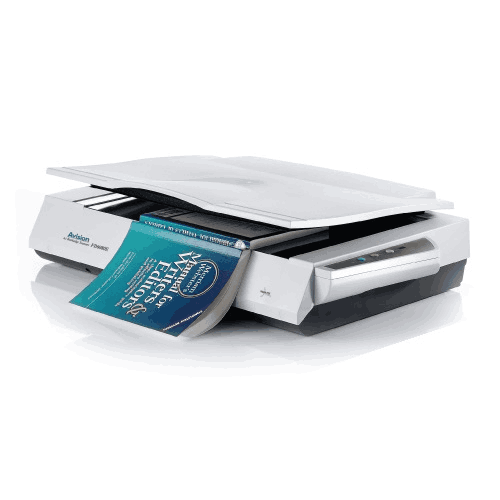
Avision FB6280E A3 Book Scanner
Regular Price:৳0.00Availability: SKU: 7.29.199.9226
Quick Overview
-
Support
Saturday – Thursday: 09 AM - 06 PM. -
Payment
Cash on Delivery | Card | Online Payment -
Shipping Cost
Inside Dhaka 100tk | Outside Dhaka 150tk -
Warranty Policy
Read More
Description
Avision FB6280E A3 Book Scanner Price in Bangladesh
The Avision FB6280E A3 Book Scanner is built for buyers who want a more balanced approach—especially when their workflow includes both A3-size originals and batch scanning. With confirmed support for A3-sized documents, a 50-sheet ADF capacity, and a daily volume guidance of up to 5,000 pages, the FB6280E fits the real needs of Bangladesh schools, libraries, office admin departments, legal and compliance teams, and archive projects that must handle both standard paper stacks and larger or more sensitive materials.
Because it includes TWAIN and ISIS drivers, it also fits professional environments where scanning must integrate with document management systems and structured office software workflows. And with a straightforward Hi-speed USB 2.0 interface, it stays simple to deploy on a dedicated workstation—common in Dhaka and Chattogram offices where one scanning desk serves multiple departments.
What “A3 book scanner” means in practical Bangladesh workflows
The term “book scanner” often signals a flatbed-style scanning option suitable for bound or delicate originals. In Bangladesh, this matters because many important records are still stored in bound registers—school attendance books, institutional registers, ledger books, and library materials. Trying to digitize those with an ADF scanner alone leads to problems: page damage, partial capture near the spine, or simply an inability to scan at all.
An A3-capable book/flatbed approach makes it easier to:
- Digitize A3 registers without folding
- Capture pages from bound books and ledgers carefully
- Preserve old paper records during archiving projects
- Scan larger certificates, forms, and institutional documents
- Create clean digital copies for sharing, backup, and retrieval
The key advantage is control. You can place a page carefully and scan without forcing it through rollers.
A3-sized document support: scan big originals the right way
A3 support is not a “nice-to-have” for many Bangladesh users—it’s the requirement that determines whether scanning is accurate or a messy workaround. With confirmed A3-sized document support, the FB6280E is relevant for:
- Education administration: A3 registers and institutional paperwork
- Engineering/technical offices: oversize forms and diagrams (where applicable)
- Legal and compliance: large attachments that must remain complete
- Libraries and archives: preserving printed A3 pages and bound materials
- Accounts departments: ledger-style pages and oversize reports
A3 scanning reduces the need for stitching two scans together, which saves time and reduces errors.
50-sheet ADF: batch scanning without constant reloading
Alongside A3 support, the FB6280E includes a confirmed ADF capacity of 50 sheets. This is an important productivity feature for Bangladesh offices that scan daily paperwork like:
- Invoices and bills
- Student files and forms
- HR and administrative documents
- Office correspondence and approvals
A 50-sheet ADF is a practical middle ground: large enough for efficient batch workflows, yet manageable in typical office setups. It helps keep scanning from becoming an all-day task—especially during busy periods like month-end closing, admissions season, or audit preparation.
Because scanning speed (ppm/ipm) and duplex capability were not provided, this page does not claim specific speeds or duplex scanning. Those details can be added if you share confirmed specs.
Daily volume up to 5,000 pages: suitable for steady institutional use
A critical piece of information you provided is the daily volume up to 5,000 pages. This positions the FB6280E for serious use—schools, busy admin offices, records departments, and organizations running ongoing digitization.
In Bangladesh, many institutions start digitization as a one-time project and then realize scanning becomes continuous: new files arrive daily, old files are gradually archived, and digital record keeping becomes normal. A 5,000 pages/day guidance makes it easier to adopt scanning as an ongoing process rather than a stressful, occasional event.
USB 2.0 interface: simple deployment on a scanning workstation
The scanner connects via Hi-speed USB 2.0. For many Bangladesh organizations, this is a practical choice:
- Easy installation on one designated PC
- Straightforward troubleshooting without network complexity
- Stable performance for routine scanning workflows
- Works well in offices where scanning is centralized
A common setup is to place the scanner in an admin/records area connected to a desktop PC, saving files to structured folders or shared storage.
TWAIN and ISIS drivers: better compatibility for professional software
The FB6280E includes TWAIN and ISIS drivers, which is valuable for business and institutional use. In many Bangladesh deployments, scanning is not only “scan to folder.” It may involve:
- Integration with document management systems
- Capture software used by banks, insurance, and large offices
- Structured indexing workflows for archives
- IT-managed scanning profiles and standardized settings
TWAIN is widely supported across scanning applications. ISIS is often important for higher-end capture solutions. Having both increases compatibility and reduces friction for IT teams.
Bangladesh use-cases where FB6280E makes strong sense
1) Schools and colleges digitizing registers
A3 register pages can be scanned cleanly and stored by year/class/section. For new records, scanning becomes routine; for old records, scanning can be scheduled in batches.
2) Libraries and archive rooms
Bound materials and large pages can be digitized carefully. ADF can handle loose sheets, while A3 support helps capture larger pages properly.
3) Government-facing offices and compliance-heavy departments
Many files include mixed document types. A scanner that supports both A3-sized documents and an ADF helps digitize complete case files more consistently.
4) Corporate admin and accounts
Batch scan daily paperwork through ADF; use A3 support for oversize sheets when needed.
5) Training institutes
Digitize student forms and supporting documents efficiently, while also handling occasional oversized paperwork.
Practical scanning workflow tips (general but useful)
- Set a scanning standard: decide DPI and file format rules per department.
- For ADF batches, remove staples and align the stack to reduce jams.
- For bound originals, scan with care to avoid damaging the spine; work page-by-page.
- Create a folder structure that matches how you retrieve records (year > department > category).
- Verify important batches immediately before returning originals to storage.
- Use consistent file naming (date + reference + name) so searching is easy later.
What this page does not claim
You did not provide optical resolution, sensor type, scanning speed, duplex support, output formats, OS support, dimensions, or power details. To keep the listing fully accurate, those specs are omitted. If you share them, I can enhance the “Short Technical Specifications” and add more verified feature explanations.
With the confirmed details provided—A3 document support, 50-sheet ADF, daily volume up to 5,000 pages, USB 2.0 interface, and TWAIN/ISIS drivers—the Avision FB6280E A3 Book Scanner is a strong fit for Bangladesh organizations that need both large-format scanning and efficient batch document capture in one scanning station.
✅ Key Features
- A3-Sized Document Support: Scans large originals used in registers, ledgers, and institutional paperwork without stitching.
- A3 Book Scanner Category Design: Supports careful scanning of bound or sensitive materials alongside regular documents.
- 50-Sheet ADF Capacity: Handles daily paperwork batches efficiently with fewer reloads.
- Daily Volume up to 5,000 Pages: Suitable for steady office/institution scanning routines and digitization projects.
- Hi-speed USB 2.0 Interface: Simple, dependable workstation connection for office deployment.
- Includes TWAIN and ISIS Drivers: Improves compatibility with scanning software and document management workflows.
- Balanced for Mixed Workloads: One device for both oversize scanning needs and routine batch scanning.
- Practical for Bangladesh Institutions: Supports common workflows in education, admin, records, and archives.
✅ Usage / Applications
- School and college register digitization where A3-sized pages are common.
- Library and archive scanning for bound materials and large-format documents.
- Accounts and ledger scanning for oversized reports and record books.
- Office document batch scanning using the 50-sheet ADF for routine paperwork.
- Legal and compliance file archiving to store complete case files digitally.
- Government liaison paperwork scanning where document completeness matters.
- Training institute admissions scanning for student records and supporting papers.
- Digitization projects that require both ADF efficiency and A3 capability.
✅ Benefits of This Product?
- Reduces time spent stitching scans by supporting A3-sized document capture in one pass.
- Improves workflow flexibility with both ADF batch scanning and book/flatbed-style scanning capability.
- Speeds up routine scanning by letting you scan stacks through the 50-sheet ADF.
- Supports consistent digitization habits with a daily volume guidance up to 5,000 pages.
- Enhances software compatibility through included TWAIN and ISIS drivers.
- Keeps deployment simple with USB 2.0 workstation connectivity.
- Improves archive reliability by enabling better handling of mixed file types and sizes.
- Fits institutional record-keeping needs common across Bangladesh education and office environments.
✅ Ideal For
The Avision FB6280E A3 Book Scanner is ideal for Bangladesh organizations that need to digitize both large-format originals and everyday paperwork without juggling multiple scanners. It’s a strong match for schools, colleges, and training institutes that maintain A3 registers and want a reliable way to archive them digitally. Libraries and archive departments will benefit from A3 support for larger pages and the book-scanning approach for bound materials, while the 50-sheet ADF supports quick digitization of loose documents. Corporate admin, legal/compliance, and accounts teams will appreciate the ability to scan routine files efficiently and still handle oversized pages when they appear. If your workflow involves steady scanning and you want a scanner rated for up to 5,000 pages per day with TWAIN/ISIS driver compatibility, the FB6280E fits naturally into professional Bangladesh scanning environments.
✅ Why Choose the Avision FB6280E A3 Book Scanner?
The FB6280E is a smart choice because it solves a very common Bangladesh office challenge: mixed scanning needs. ADF scanners are excellent for stacks, but they struggle with A3-sized and bound originals. Flatbed/book scanning is safer for sensitive materials, but it’s slower for routine paperwork if you don’t have an ADF. By combining A3 document support with a 50-sheet ADF, the FB6280E gives you both: the ability to scan large originals properly and the ability to process everyday documents efficiently.
It’s also positioned for consistent institutional use with a daily volume guidance up to 5,000 pages, making it appropriate for schools, records departments, and offices running ongoing digitization projects. The inclusion of TWAIN and ISIS drivers further strengthens its value for professional environments, because it improves compatibility with a wide range of scanning applications and document management workflows. Finally, USB 2.0 connectivity keeps setup straightforward—ideal for dedicated scanning stations in Dhaka and Chattogram offices where stability and simplicity matter.
✅ Why Buy This Product from BME?
For Bangladesh organizations, buying an A3-capable scanner is not only about the device—it’s about ensuring it fits your documents, your daily volume, and your software environment. Business Machine & Equipment (BME) can help you choose the Avision FB6280E with practical clarity: whether you’re scanning school registers, office records, or archive materials, and whether you need driver compatibility for specific applications.
BME can support procurement-friendly purchasing for institutions and businesses, including quotation and documentation for accounts. If you share your document types and expected daily scanning load, BME can also help you plan a smoother scanning workflow—how to organize batches for the ADF, how to structure digital folders for retrieval, and how to prepare bound or sensitive originals for safe scanning. This reduces trial-and-error and helps your investment deliver productivity improvements quickly.
✅ Buying Guide
- Step 1: Confirm A3 is essential: If you scan registers, ledgers, or oversized forms, A3 support prevents scan stitching and preserves completeness.
- Step 2: Check your batch size needs: A 50-sheet ADF is practical for routine office stacks; if you scan much larger stacks, consider higher-capacity feeders.
- Step 3: Plan your daily workload: If scanning is steady, a model rated up to 5,000 pages/day fits better for institutional routines.
- Step 4: Decide software compatibility requirements: TWAIN and ISIS drivers are important for integration with many professional scanning applications.
- Step 5: Plan your scanning station: USB scanners work best connected to a dedicated PC with organized storage folders.
- Step 6: Define output organization rules: Use folder structures based on department/year/project, plus consistent file naming.
- Step 7: Separate document types: Use the ADF for loose stacks; use the book/A3 scanning capability for oversized or bound originals.
- Step 8: Verify important batches: Check completeness before returning originals to files or archives.
- Step 9: Avoid common mistakes: Don’t fold A3 documents to fit smaller scanners; don’t scan stapled stacks through the ADF; don’t mix very different paper conditions in one batch.
- Step 10: Plan archiving discipline: Create backup routines so scanned records are preserved safely.
✅ Customers Ask About / Frequently Asked Questions
-
Q: Does the Avision FB6280E support A3 documents?
A: Yes. It is specified to support A3-sized documents. -
Q: Does it have an ADF for batch scanning?
A: Yes. The ADF capacity is listed as 50 sheets. -
Q: What is the recommended daily scanning volume?
A: Daily volume is specified as up to 5,000 pages. -
Q: What interface does it use to connect to a PC?
A: It uses Hi-speed USB 2.0. -
Q: Are TWAIN and ISIS drivers included?
A: Yes. It is specified to include TWAIN and ISIS drivers. -
Q: Is it suitable for scanning bound books and registers?
A: Yes. As an A3 book scanner category product, it’s suited to scanning bound or large-format materials, and also supports ADF batch scanning for loose pages. -
Q: Does it support duplex scanning?
A: Duplex scanning was not specified in the information provided, so it is not stated here. -
Q: Can it be used for office invoice scanning?
A: Yes. The 50-sheet ADF makes it suitable for routine office paperwork batches like invoices and forms. -
Q: Is USB 2.0 enough for office scanning?
A: For many office workflows, USB 2.0 is widely used and simple to support. Actual performance depends on scan settings and workflow. -
Q: What software does it come with?
A: The provided information confirms the inclusion of TWAIN and ISIS drivers; other bundled software details were not provided.
✅ Why Buy This Product
If your organization in Bangladesh needs to digitize A3-sized documents and also handle everyday paperwork efficiently, the Avision FB6280E A3 Book Scanner offers a practical balance. It supports A3 documents to eliminate stitching and preserve large originals, while its 50-sheet ADF helps you process routine stacks without constant reloading. With a daily volume guidance up to 5,000 pages, it’s built for steady institutional use, and the included TWAIN/ISIS drivers make it easier to integrate into professional scanning environments.
What is the price of Avision FB6280E A3 Book Scanner in Bangladesh?
Write a review
Question Answer
Have question about this product? Get specific details about this product from expert.

Canon CanoScan Lide 300 Flatbed Scanner


Avision FB5000 A3 Size Slim Flatbed Scanner



Avision FB5000 A3 Size Slim Flatbed Scanner




Avision AD5800 High-Valume A3 Document Scanner

AVISION MiWand 2 Wi-Fi Pro Portable Scanner


Avision AV332U Sheet-fed Document Scanner

Avision AD345GFWN Flatbed Color Document Scanner

Avision AD130 Flatbed Color Document Scanner


